The Video agency vod.dma.swiss is the module for internal and external video presentation. Employees can publish, manage, tag, and release videos on up to six channels – without assigning any image or usage rights to third parties.
You can order the Video agency for your team here or, for further questions, contact support@dma.swiss directly.
Choose a username that everyone can recognize and a strong password (≥ 10 characters, upper/lowercase, number, special character).
You will receive an e-mail with a confirmation link – click it.
Your unit’s platform manager registers your e-mail at support@dma.swiss; activation follows within one working day.
3. How do I change my password or edit my profile later?
Click on the profile icon (top right) → “Edit Profile.” There you can: change your password, update your profile picture and banner, make your profile visible or invisible, manage notifications.
4. What are channels and how do I get one?
Channels group thematic content. Six channels per organisational unit are included in the Video agency module. Channels are created only by the admin team. To order one, the OE platform manager sends an e-mail to support@dma.swiss with :
User-created playlists to collect content from various channels. Required fields: title and description. Then go to “Manage Media → Add Media” to include images and videos.
6. How do I upload videos or photos?
Click “Upload” (top right) or drag and drop the file into the window. For videos, you can set a custom thumbnail. If the content should be published into a channel, select “Add to Channel.”
7. What file sizes, formats, and resolutions are allowed?
Videos: MP4 format, up to 500 GB. After upload, automatic transcoding into 480p–2160p (no upscaling).
8. Which fields are mandatory?
Title
SEO URL title
Description
Tags (comma-separated)
Category
Good tagging and correct category make it easier to find content later.
9. How do I set the visibility of an upload?
Public – visible to everyone.
Hidden – accessible only via the direct URL.
Private – only you can see the video.
Password-protected – hidden URL requiring a password (sent separately via Threema).
10. How do I share media or embed it?
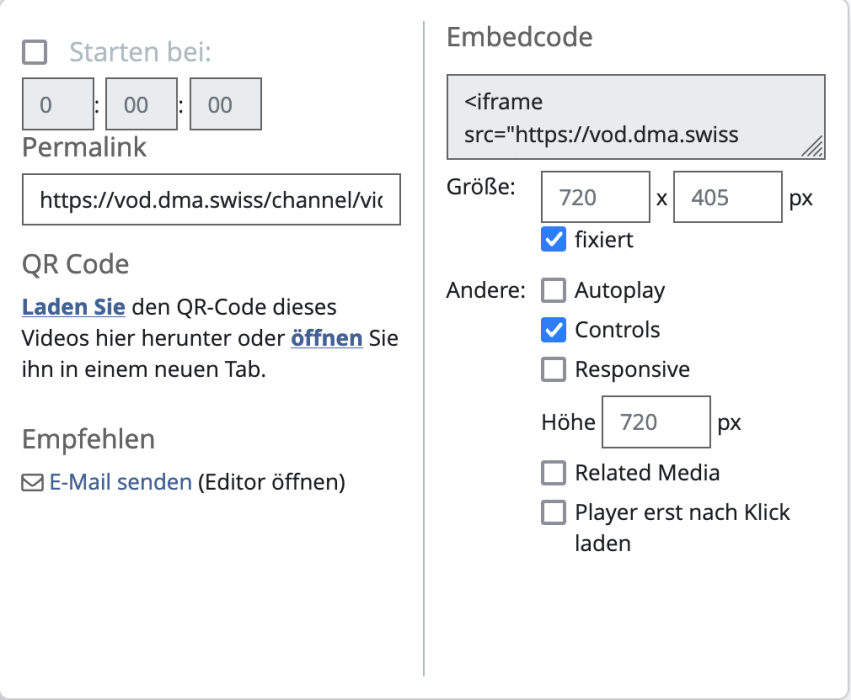
Under the media item, click Share: Link (optional start time), QR code, Email, iframe: copy the iframe code and enable “Responsive” for embedding on websites. This way, a video can also be embedded in the LivingDocs CMS.
11. Where can I get help?
Contact the FOITT Service Desk at +41 58 465 88 88 for any questions.